Best Seller Icon Bestseller

Completion In V-RAY(S-CV-7963)

  • Last updated Oct, 2026
  • Certified Course

Course Includes

  • Duration1 Month
  • Enrolled0
  • Lectures25
  • Videos0
  • Notes0
  • CertificateYes

What you'll learn

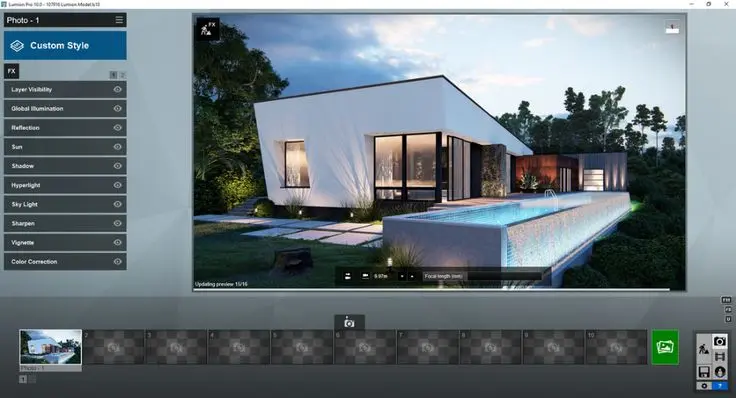
V-Ray is a professional rendering and visualization course designed to teach learners how to create realistic, high-quality architectural and 3D renders using advanced materials, lighting, cameras and rendering techniques.

The course covers the complete V-Ray workflow, beginning with scene preparation and material creation and progressing to advanced texturing, realistic interior and exterior lighting, HDRI environments, global illumination, reflections, refractions, displacement, rendering optimization and post-production.

Learners will work on practical interior, exterior, residential and commercial visualization projects, developing portfolio-ready rendering skills.

What You Will Learn

  • V-Ray interface and rendering workflow
  • 3D scene preparation
  • V-Ray material creation
  • Realistic architectural materials
  • Glass, metal, wood, fabric and stone materials
  • Texture and UV mapping
  • Bump, normal and displacement maps
  • Interior lighting
  • Exterior lighting
  • V-Ray Sun and Sky
  • HDRI lighting
  • V-Ray cameras
  • Composition and exposure
  • Global illumination
  • Reflection and refraction
  • Render optimization
  • V-Ray proxies and scene management
  • Render elements
  • Post-production
  • Photorealistic architectural visualization

Who Can Join?

  • Architecture Students
  • Interior Design Students
  • Civil Engineering Students
  • 3D Design Students
  • 3ds Max Learners
  • Architectural Designers
  • Interior Designers
  • 3D Visualizers
  • CAD Designers
  • 3D Modelers
  • Visualization Artists
  • Rendering Professionals
  • Construction and Design Professionals

Prerequisite

  • Basic computer knowledge
  • Basic understanding of 3D concepts
  • Basic knowledge of 3ds Max or another compatible 3D modeling platform is recommended
  • Architectural or interior design knowledge is helpful
  • Basic understanding of materials and lighting is beneficial
  • No previous V-Ray experience is required

Course Outcome

After completing the course, learners will be able to:

  • Set up V-Ray rendering projects
  • Prepare 3D scenes for rendering
  • Create realistic V-Ray materials
  • Apply textures and surface maps
  • Create realistic glass, metal, wood, stone and fabric materials
  • Set up interior and exterior lighting
  • Use HDRI environments
  • Configure V-Ray cameras
  • Create realistic reflections and refractions
  • Use global illumination techniques
  • Optimize rendering quality and performance
  • Create professional architectural renders
  • Perform basic render post-production
  • Develop portfolio-ready visualization projects

Career & Learning Opportunities

Learners can explore roles such as:

  • V-Ray Renderer
  • 3D Visualization Artist
  • Architectural Visualizer
  • Architectural Rendering Artist
  • Interior Visualization Artist
  • 3D Rendering Artist
  • 3D Visualizer
  • Architectural 3D Designer
  • Interior 3D Visualizer
  • 3D Modeler
  • 3D Visualization Designer
  • Rendering Specialist
  • Architectural Visualization Designer
  • Interior Rendering Artist
  • 3D Design Assistant
  • Visualization Project Assistant
  • Architectural Presentation Designer
  • 3D Rendering Assistant


Show More

Course Syllabus

Module 1 – Introduction to V-Ray

  • Introduction to V-Ray rendering engine
  • V-Ray workflow and applications
  • Understanding the V-Ray interface
  • Renderer setup and configuration
  • V-Ray tools and features
  • Basic rendering concepts
  • Setting up a V-Ray project

Module 2 – 3D Scene Preparation

  • Preparing 3D models for rendering
  • Scene organization
  • Object naming and grouping
  • Units and scale
  • Model optimization
  • Managing scene elements
  • Preparing architectural scenes

Module 3 – V-Ray Materials Fundamentals

  • Introduction to V-Ray materials
  • Creating basic materials
  • Material properties
  • Diffuse, reflection and refraction
  • Glossiness and roughness
  • Material assignment
  • Material preview and testing

Module 4 – Advanced Materials

  • Advanced V-Ray material creation
  • Glass and transparent materials
  • Metal materials
  • Wood and stone materials
  • Fabric and leather materials
  • Plastic and ceramic materials
  • Realistic material settings

Module 5 – Texture Mapping

  • Introduction to texture maps
  • Bitmap textures
  • Diffuse and reflection maps
  • Bump and normal maps
  • Displacement maps
  • Texture coordinates
  • Applying textures to 3D models

Module 6 – UV Mapping and Material Coordination

  • UV mapping fundamentals
  • Mapping architectural surfaces
  • Texture scale and orientation
  • Managing UV coordinates
  • Correcting texture distortion
  • Material consistency across objects
  • Creating realistic surface finishes

Module 7 – V-Ray Lighting Fundamentals

  • Fundamentals of realistic lighting
  • V-Ray Light types
  • Area lights
  • Dome and Sun lighting
  • Light intensity and color
  • Shadows and light direction
  • Basic lighting setups

Module 8 – Interior Lighting

  • Interior lighting principles
  • Daylight setup
  • Artificial lighting
  • Window lighting
  • Ceiling and decorative lights
  • Balanced interior illumination
  • Realistic indoor lighting workflow

Module 9 – Exterior Lighting

  • Exterior daylight setup
  • V-Ray Sun and Sky
  • HDRI-based lighting
  • Sun position and intensity
  • Evening and night lighting
  • Exterior shadows
  • Architectural exterior lighting

Module 10 – Cameras and Composition

  • V-Ray camera fundamentals
  • Camera placement
  • Perspective control
  • Field of view
  • Exposure settings
  • Depth of field
  • Professional architectural composition

Module 11 – V-Ray Environment and HDRI

  • Environment settings
  • Background creation
  • HDRI workflow
  • HDRI reflections
  • Sky and environment lighting
  • Exterior environment setup
  • Creating realistic surroundings

Module 12 – Rendering Settings

  • Introduction to V-Ray rendering settings
  • Image resolution
  • Quality settings
  • Sampling concepts
  • Anti-aliasing
  • Noise control
  • Render optimization

Module 13 – Global Illumination and Advanced Rendering

  • Global illumination concepts
  • Primary and secondary GI methods
  • Light bounce
  • Interior GI workflow
  • Exterior GI workflow
  • Improving realism
  • Balancing quality and render time

Module 14 – Reflection, Refraction and Effects

  • Reflection fundamentals
  • Refraction fundamentals
  • Transparent materials
  • Glossy reflections
  • Fresnel effects
  • Glass and liquid visualization
  • Advanced material effects

Module 15 – V-Ray Displacement and Advanced Surface Effects

  • Displacement fundamentals
  • Bump and normal mapping
  • Creating detailed surfaces
  • Stone and brick surfaces
  • Ground and terrain detailing
  • Surface imperfections
  • Realistic material enhancement

Module 16 – Architectural Visualization

  • Interior architectural visualization
  • Exterior architectural visualization
  • Residential visualization
  • Commercial building visualization
  • Furniture and interior presentation
  • Realistic materials and lighting
  • Professional architectural renders

Module 17 – Advanced V-Ray Workflow

  • Scene optimization
  • Proxy objects
  • Asset management
  • Render elements
  • Batch rendering concepts
  • Large-scene management
  • Professional rendering workflow

Module 18 – Post-Production and Render Enhancement

  • Introduction to post-production
  • Render element workflow
  • Color correction
  • Exposure adjustment
  • Contrast and brightness
  • Background enhancement
  • Final image improvement

Module 19 – Practical V-Ray Projects

  • Residential interior rendering
  • Living room visualization
  • Bedroom or office rendering
  • Exterior building visualization
  • Commercial interior project
  • Material and lighting project
  • Final photorealistic rendering

Module 20 – Final V-Ray Project & Assessment

  • Complete architectural visualization project
  • 3D scene preparation
  • Material development
  • Texture mapping
  • Interior/exterior lighting
  • Camera composition
  • Final rendering
  • Post-production
  • Portfolio presentation and assessment


Review

0.0
Course Rating (0 reviews)
0%
0%
0%
0%
0%


Call
Text Message
Review
Email
CHAT